Introduction
Folio Board is the project board that lives in your repository, powered by Folio : one Markdown file per card, versioned in git, read and edited the same way by people and coding agents, and published with the rest of your documentation.
Built for agents first
A card is a file an agent reads and edits like any other file in the checkout.
The SKILL.md beside the board teaches it the protocol, and the CLI checks
each change and can record it as one narrow commit. People work the same files,
from the CLI, an editor, code review or the kanban.
board.yaml declares the columns and their limits, each file in cards/ is
one card, and agents.yaml tells the CLI where the board is.
Check: the tree above reads as if the board shared the code’s branch. It does not have to:
initcreates a separateboardbranch by default,kanban.refpublishes a board from another branch through a managed worktree (Boards on another branch), and a board in another repository is an idea (board.store, read by nothing yet). This section and its tree need rewriting to say where a board can live.
| Who does what | Folio Board | Your agents and people |
|---|---|---|
| Card state, priority, parents and blockers | — | |
| Acceptance criteria, comments, trails and artifacts | — | |
| Checking every change and committing it | — | |
| Choosing which agent works a card | — | |
| Doing the work and pushing it | — |
Folio Board orchestrates none of the agents you already use, such as Codex and Claude Code: each reads the same cards and follows the same protocol.
Powered by Folio
The board runs on Folio, the documentation engine. One kanban: section in
docs.yaml puts the board on your docs site, and the site brings the rest.
Folio is optional
Board commands need no site, server, Node.js runtime or Docs build. Without a
kanban: section the canvas stays inert, and the board is files and a CLI.
Deployed the way you need
The files in git are always the source of truth. The board reaches its readers in more than one way:
The canvas
The board below is live: it is the example board this site publishes, rendered
by the KanbanBoard component from the files in the tabs under it. The full
canvas, with filters and the card reader, is at /kanban.
The example board, embedded in this page
One component in any docs page of a site with a kanban: section.
<KanbanBoard compact maxCardsPerColumn={3} />kanban:
source: fixtures/board/board
landing: true
routes:
public: "/board"
docs: falsetitle: "Fixture Board"
icons:
docs: "📘"
columns:
- id: ideas
title: Ideas
- id: in-progress
title: In progress
limit: 2
- id: done
title: Done---
title: Write the adapter
status: in-progress
type: feature
size: m
assignee: [ana, bo]
track: rust
parent: plan-the-release
created: 2026-09-05
milestone: "0.1"
order: 10
artifacts:
- doc: report.md
label: Design report
- pr: 42
- url: https://example.com/spec
---
Port the render adapter, one module at a time.
## Acceptance criteria
- [ ] data modules match
- [ ] pages match
## Trail
- 2026-09-05 @bo (abc1234): started the port---
title: Ship the alpha
status: done
blocked_by: [write-the-adapter]
created: 2026-09-10
milestone: "0.9"
---
Cut the tag once the adapter lands.
## Comments
- 2026-09-11 @ana: waiting on the adapter.
## Trail
- 2026-09-10 @ana: card createdThe canvas never becomes the source of truth
On a static board, a staged move is exported as a folio-agents board move
command, reviewed, and committed to the board branch. On a live board, the
server writes the card file and commits it.
The card
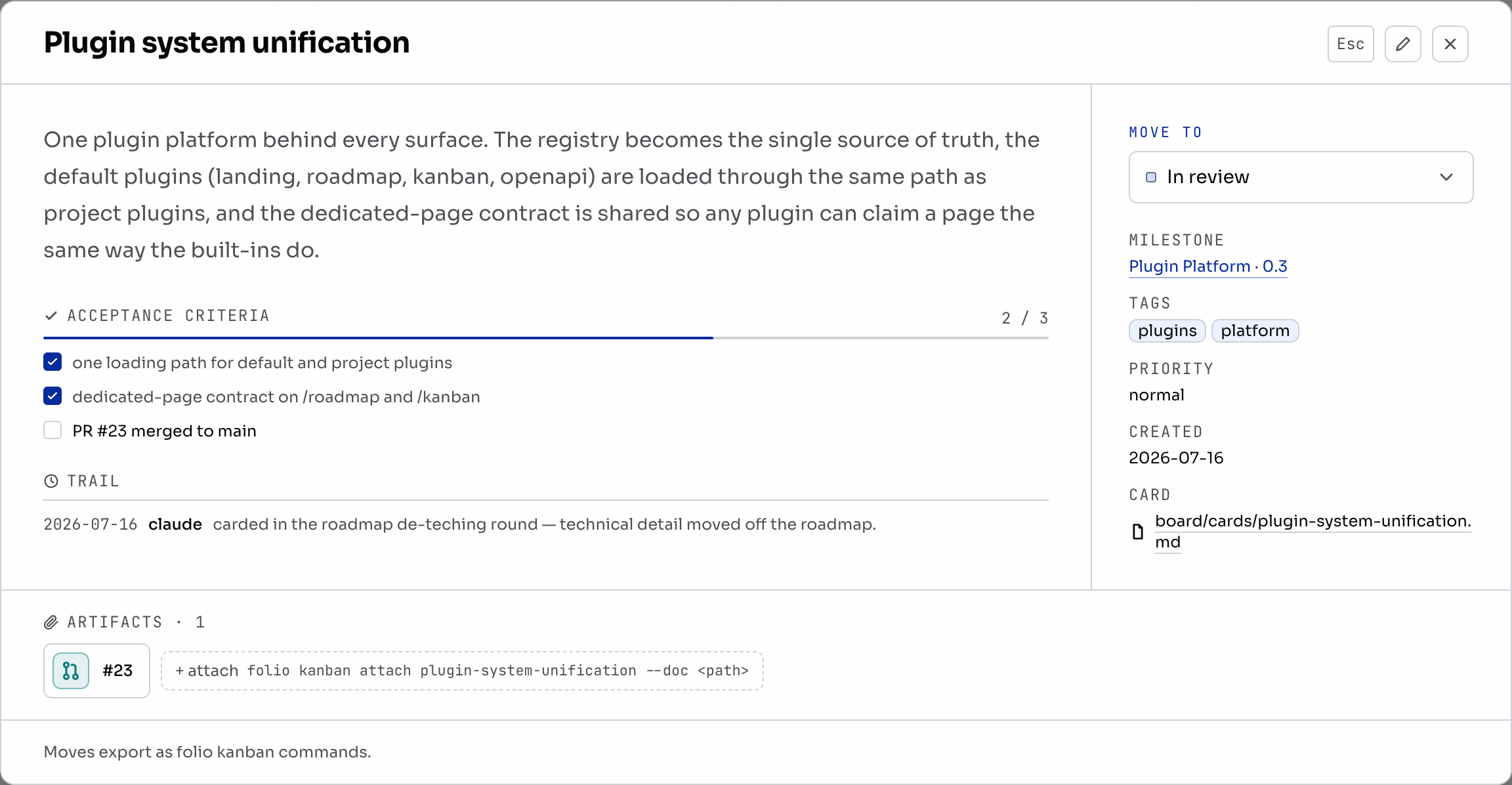
On the public canvas, clicking a card extends one continuous workspace:
filters, canvas, card, then artifact. Later context opens farther right when
space permits and continues below otherwise. Hairline separators resize each
surface by pointer or keyboard, Esc unwinds one level, and the URL restores
the selected card and artifact. Readable artifacts can use native full screen.
Docs embeds keep the modal treatment. The permanent id remains the Markdown
filename, not its screen position.
Filtering
The canvas accepts one shareable ?q= expression. Spaces mean AND, commas mean
OR, and a leading minus excludes a term. Fields such as status, priority,
tag, milestone, and assignee narrow the same board without creating a
second source of truth.
Use the bookmark beside the query to save a named filter, such as
“Review 0.6” for status:in-review milestone:0.6. The popup opens, renames
and removes filters. They stay in this browser, separated by board and
signed-in account. Selecting one applies its query to the same shareable URL;
changing the query leaves the saved version intact. No cards change.
Moving a card
Drag a card or choose a destination in its dialog. On a static board the move
stays in local browser storage until Export moves produces the
corresponding folio-agents board move commands. Reset to source discards
staged moves.
On a live board the drop is the commit: the server writes status: and commits
board: <id> <from> -> <to>, and Undo moves the card back with a second
commit. Edit the board in the browser lists every edit a live card
takes.
What ships today
folio-agents board is the board command of the folio-agents binary, which
is Folio Docs’ CLI with the board mounted on it. Folio Docs’ own folio has no
board command; the two install side by side.